
Optimizing Application Performance with Change Management Improvements - Part 1

Mike Cuppett

This blog is an excerpt from DevOps, DBAs, and DBaaS by Mike Cuppet.

End-to-End Response Time

Network packet collectors such as Netmon or Wireshark capture network traffic and provide information about when a request was sent until the response was received — from the network perspective as the capture is taken at the computer's network interface. The gap is the presentation layer, the processing that happens between the browser and the network on the computer. For that, using a product such as Fiddler, HttpWatch, or the Inspect function in certain browsers provide the truest timings.

Combining a packet capture and a browser-level timing makes determining slowness on the user's computer relatively easy, although only a very minute percentage of application performance problems happen at the local computer. But just because multiple users have reported slowness, you should not disregard the client infrastructure. Many companies distribute the same image to many computers, which allows for the possibility that a client-side change has caused a problem. Figure 6-3 demonstrates a packet capture, showing packet sequence, time elements, and packet descriptions.
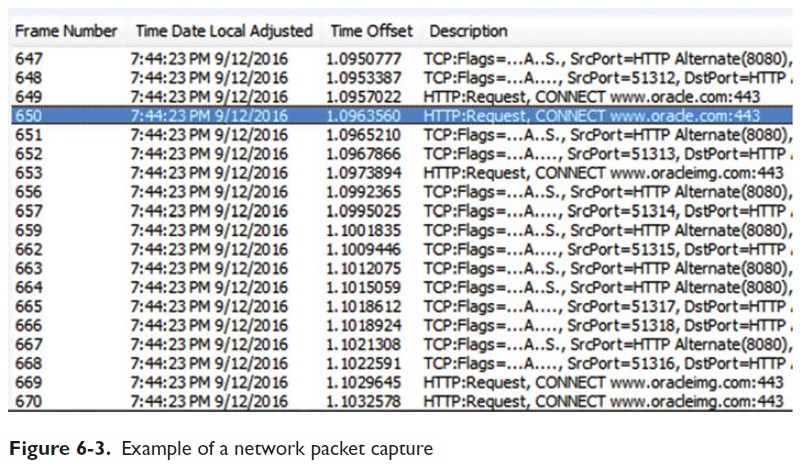

Note: The packet capture can be analyzed further to determine transaction times.

Figure 6-4 shows a proxy capture using HttpWatch . Notice the http calls, execution duration bars, and time data.
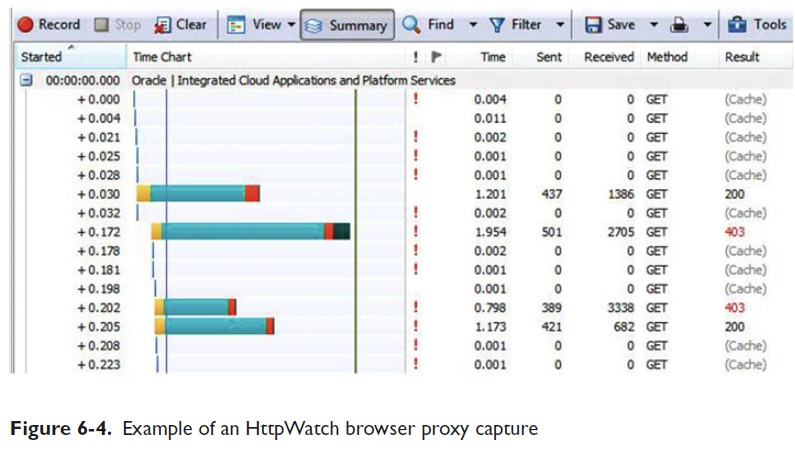

The duration bars make it easy to see which calls take the most time. Imagine the example data being from your application with timings ten times as high. Improving application performance with just this information is possible by investigating each long bar http call.

Figure 6-5 was captured using the browser's Inspect tool , which is accessed by right-clicking the web page in a location without links (a blank space).
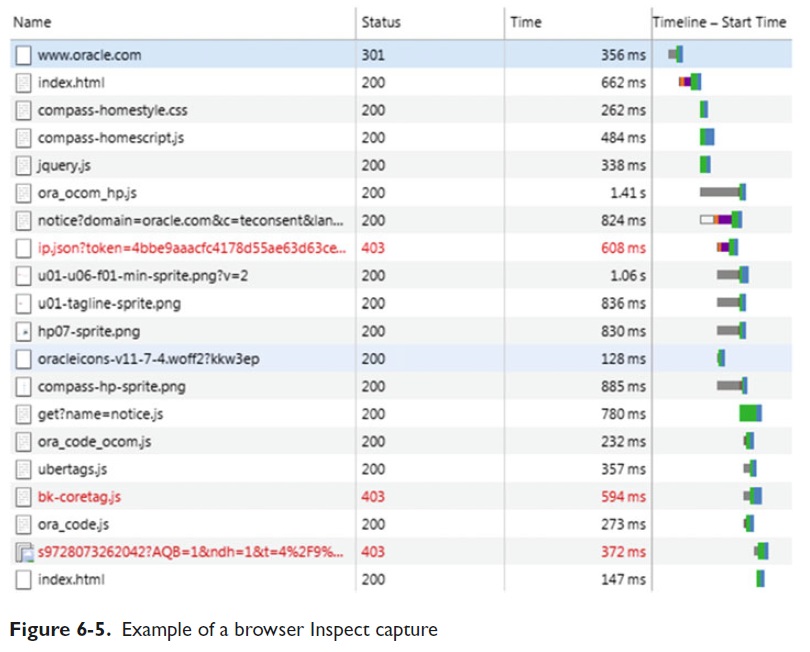

Note Again: The long statement durations have to be investigated further for potential performance enhancements.

Similar analysis should be done as part of the DevOps pipeline to hunt and kill performance-draining beasts. As code is tested in the pipeline against the development and integration ecosystems, collecting performance data sets enables a deep analysis of each code statement's impact on performance. Obviously, statements found violating predetermined baseline performance values must be tuned prior to production release.

Although I simply collected data using a browser call to www.oracle.com to provide simple examples, code performance analysis may require including code within the application that captures performance information or start and stop times for each execution. By now, you may realize that the types and count of the possible checks are vast; your goal is to determine which checks, done where, bring the best results.

The infrastructure example exists in real life because customers visiting the company web site expect great response times. What happens behind the curtain is the DevOps team's responsibility to deliver. If the application reaches out for credit card authorization or to validate the visitor's membership needed for a discount, that time needs to be analyzed before and after changes are made.

As shown, digging out exact timings provides a much better understanding of the application performance — broken into manageable chunks for analysis and correction.

Read Optimizing Application Performance with Change Management Improvements - Part 2
Hot Topics

The Latest

The enterprises that will define the next decade are not the ones that deployed the most technology. They are the ones who understood what their technology was actually doing. That distinction is not a philosophical point. It is the central operational challenge facing every organization that has spent the last five years modernizing at speed ...

AI is becoming the operating system of the enterprise. It acts as an invisible coordination layer that understands intent, connects systems, and executes work across complex SaaS environments. Previously, employees had to click through multiple systems — CRM, ERP, support tools, collaboration platforms — to complete a single task. Now, instead of navigating each application manually, they can simply state what they need to accomplish ...

In 2026, the cost of downtime or an outage is no longer just a technical inconvenience; it's a $600 billion wake up call for global businesses. As our digital ecosystems become  more interconnected, each touchpoint introduces new risks and multiplies the consequences when things go wrong. And the data is clear: aggregate downtime costs  for Global 2,000 companies have surged 50% since 2024, reaching a staggering $600 billion ...

Deloitte found that 74% of enterprises expect to deploy agentic AI solutions in the next 24 months. However, the rush to deployment is outpacing foundational work, though. Only 21% of enterprises have fully formed agent governance models in place. The result? AI agents deployed without guidance or governance begin to function as fragmented islands of complexity ...

Cloud spending is no longer viewed as a passthrough IT expense, but as a strategic financial lever that directly impacts innovation capacity, profitability and enterprise resilience, according to the CFO Cloud Cost Optimization Report from Azul ...

Optimizing Application Performance with Change Management Improvements - Part 1

Mike Cuppett

This blog is an excerpt from DevOps, DBAs, and DBaaS by Mike Cuppet.

End-to-End Response Time

Network packet collectors such as Netmon or Wireshark capture network traffic and provide information about when a request was sent until the response was received — from the network perspective as the capture is taken at the computer's network interface. The gap is the presentation layer, the processing that happens between the browser and the network on the computer. For that, using a product such as Fiddler, HttpWatch, or the Inspect function in certain browsers provide the truest timings.

Combining a packet capture and a browser-level timing makes determining slowness on the user's computer relatively easy, although only a very minute percentage of application performance problems happen at the local computer. But just because multiple users have reported slowness, you should not disregard the client infrastructure. Many companies distribute the same image to many computers, which allows for the possibility that a client-side change has caused a problem. Figure 6-3 demonstrates a packet capture, showing packet sequence, time elements, and packet descriptions.


Note: The packet capture can be analyzed further to determine transaction times.

Figure 6-4 shows a proxy capture using HttpWatch . Notice the http calls, execution duration bars, and time data.


The duration bars make it easy to see which calls take the most time. Imagine the example data being from your application with timings ten times as high. Improving application performance with just this information is possible by investigating each long bar http call.

Figure 6-5 was captured using the browser's Inspect tool , which is accessed by right-clicking the web page in a location without links (a blank space).


Note Again: The long statement durations have to be investigated further for potential performance enhancements.

Similar analysis should be done as part of the DevOps pipeline to hunt and kill performance-draining beasts. As code is tested in the pipeline against the development and integration ecosystems, collecting performance data sets enables a deep analysis of each code statement's impact on performance. Obviously, statements found violating predetermined baseline performance values must be tuned prior to production release.

Although I simply collected data using a browser call to www.oracle.com to provide simple examples, code performance analysis may require including code within the application that captures performance information or start and stop times for each execution. By now, you may realize that the types and count of the possible checks are vast; your goal is to determine which checks, done where, bring the best results.

The infrastructure example exists in real life because customers visiting the company web site expect great response times. What happens behind the curtain is the DevOps team's responsibility to deliver. If the application reaches out for credit card authorization or to validate the visitor's membership needed for a discount, that time needs to be analyzed before and after changes are made.

As shown, digging out exact timings provides a much better understanding of the application performance — broken into manageable chunks for analysis and correction.

Read Optimizing Application Performance with Change Management Improvements - Part 2

Hot Topics

The Latest

The enterprises that will define the next decade are not the ones that deployed the most technology. They are the ones who understood what their technology was actually doing. That distinction is not a philosophical point. It is the central operational challenge facing every organization that has spent the last five years modernizing at speed ...

AI is becoming the operating system of the enterprise. It acts as an invisible coordination layer that understands intent, connects systems, and executes work across complex SaaS environments. Previously, employees had to click through multiple systems — CRM, ERP, support tools, collaboration platforms — to complete a single task. Now, instead of navigating each application manually, they can simply state what they need to accomplish ...

In 2026, the cost of downtime or an outage is no longer just a technical inconvenience; it's a $600 billion wake up call for global businesses. As our digital ecosystems become  more interconnected, each touchpoint introduces new risks and multiplies the consequences when things go wrong. And the data is clear: aggregate downtime costs  for Global 2,000 companies have surged 50% since 2024, reaching a staggering $600 billion ...

Deloitte found that 74% of enterprises expect to deploy agentic AI solutions in the next 24 months. However, the rush to deployment is outpacing foundational work, though. Only 21% of enterprises have fully formed agent governance models in place. The result? AI agents deployed without guidance or governance begin to function as fragmented islands of complexity ...

Cloud spending is no longer viewed as a passthrough IT expense, but as a strategic financial lever that directly impacts innovation capacity, profitability and enterprise resilience, according to the CFO Cloud Cost Optimization Report from Azul ...