
5 Reasons to Migrate to UCaaS

Hybrid and remote work models are a reality in the present and future of work, despite efforts to return employees to the office. With 74% of US companies planning to or having already implemented hybrid work policies, identifying and implementing a unified communication as a service (UCaaS) solution that will address both employee and organizational needs is non-negotiable in the future of work, according to Info-Tech Research Group's latest research, Assess Your Readiness to Implement UcaaS.

"Given the reality of the new ways people work, there's a genuine need for a UCaaS solution," says John Donovan, Principal Research Director in the I&O Practice at Info-Tech Research Group. "Aside from remaining agile when accommodating different work locations, it's advantageous to be able to quickly scale. New technology is moving at such a rapid pace that using a UCaaS tool is truly beneficial, especially given its AI, analytics, and mobile capabilities. Being held back by an on-premises solution is no longer a wise option."
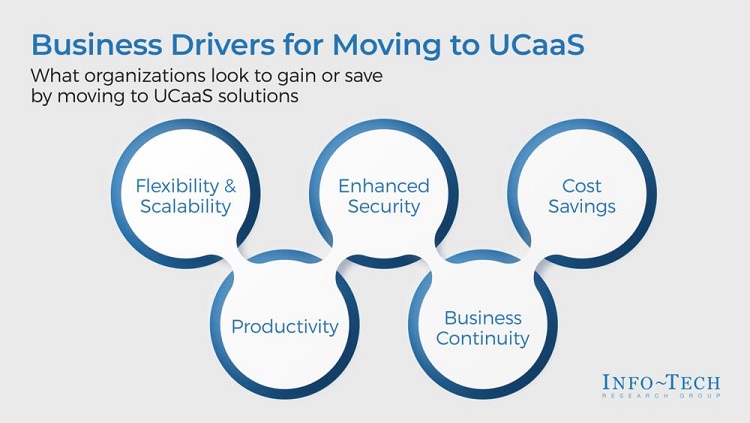

There are numerous organizational benefits to UCaaS, as indicated above, but Info-Tech Research Group's research pinpoints five key reasons for migration to a UCaaS solution:

1. Advanced technology

Cloud hosting and advanced technology provides the ability to deploy advanced communications technology quickly and offers a faster, easier communication flow across teams and with customers with phone, messaging, audio, and video conferencing available in one place.

2. Scalability

Since UCaaS is an on-demand service, companies can scale their communication needs to what is immediately required at an affordable price.

3. Cost efficient

With the implementation of UCaaS, the need for multiple platforms and devices is eliminated, allowing companies to purchase a single communication management tool in place of several.

4. Highly available

As the need for a robust UCaaS tool grows, an increasing number of reputable vendors are offering customizable solutions to meet both organizational and employee needs.

5. Security

UCaaS offers robust security, with a single point of contact for troubleshooting, built-in redundancy for improved reliability, enhanced data security, and reduced risk of fraud.

As remote and hybrid work present additional challenges for IT management, UCaaS offers a host of benefits that make the IT function run more efficiently overall. Some of these benefits include eliminating ongoing maintenance as well as a decreased need for upgrades and patching and managing servers or private branch exchanges (PBXs). UCaaS is easy to deploy, and due to its scalability and flexibility, users can easily be added or removed as required.

"The days of on-premises private branch exchange (PBX) and legacy voice over internet protocol (VoIP) solutions are numbered, and organizations are examining alternative solutions to redundant desk phones. The new norm must be a cloud-based solution that integrates via application programming interface (API) with content resource management (CRM), email, chat, and collaboration tools," explains Donovan.

Hot Topics

The Latest

Performance bottlenecks aren't uncommon when it comes to rolling out new technology, regardless of how capable or game-changing that technology might be. Every generation of new tech has encountered roadblocks that had to be overcome before it was truly able to shine. Virtualization forced organizations to rethink resource allocation, cloud transformation had us shift our focus toward scalability and elasticity, and microservices introduced entirely new challenges around observability and distributed systems. There's something different about AI, however ...

Consider a single order represented across order-management, execution, and settlement systems. Each database, message broker, and application may be online and processing its own records correctly. Yet the workflow has failed if related events arrive on different clocks, rely on inconsistent state, or cannot be reconciled before an operational decision must be made ...

AI now exists in almost every IT workflow. In a recent survey of more than 800 IT service professionals, all respondents indicated the use of AI in some form within their organization. But there's a growing paradox: if dashboards are clearing faster and alerts are resolved at unprecedented speed, why aren't IT service desks reporting lighter workloads? The research found that 71% of IT teams said their actual workload has remained flat or increased since adopting AI. This reality appears to contradict what we’ve been told about AI ...

Two years ago, almost every customer conversation about AI started with the same questions: Which model should we use? What can it do? Is it ready for the enterprise? Today, those discussions have moved on. CIOs are far more interested in how to govern AI, integrate it with existing systems, prepare their workforce and make it part of everyday operations. The challenge is no longer to prove that AI can deliver value. It's instead about how to embed AI into the business in a way that's secure, scalable and delivers measurable outcomes ...

Two things happened to production incidents between 2023 and now, and they did not happen at the same speed. The first is that a class of dependency that barely existed three years ago now accounts for one incident in ten. Incidents disclosed by AI model and AI application providers rose from 1.7% of all disclosed unplanned incidents in 2023 to 10.7% in 2026 year to date, roughly a sixfold rise; that counts only incidents at AI companies themselves, so the true share is higher. The second is that the time to close an incident has not come down ...

When an AI assistant gives an incomplete or incorrect answer, teams often blame the model. They adjust prompts, switch models, increase context windows or test a new retrieval strategy. However the model may not be a problem. In many enterprise AI workflows, the problem begins inside the document-ingestion pipeline ...

If you talk to any security or observability teams right now, they're all fighting the same fire: their tooling was built to ingest X, but their sources are pumping Y and soon to be doing Z. The knee-jerk reaction is always the same: we need more platform. However, this reaction is wrong. Let me explain why, because the solution to this problem is foundational, not financial. Instead of hurling yet more money at the problem, make sure you've done what's needed upstream ...

Rapid AI adoption and the unique ways AI workloads operate is redefining the scope and structure of what these teams must deliver. This shift is forcing organizations to rethink how they manage scale, automation, and control, according to The State of SRE and Platform Engineering 2026, a new report from Dynatrace ...

AI is usually talked about as a software tool, but it also depends heavily on the network behind it. Whether a company is using AI for chatbots, automation, monitoring, analytics, or employee support, all of that information has to move across the network in a reliable and secure way. That means AI is not just an application decision. It is also an infrastructure decision. Before organizations rush into AI, they should ask a simple question: Is our network ready to support it? ...

Enterprise AI often lacks governed access to where business processes actually execute. Without that access, AI agents may be able to reason, but they cannot operate reliably across enterprise workflows. For AI agents to effectively carry out workflows, they will require integration-layer context and controls. Organizations can implement these prerequisites by providing AI with managed access to the middleware layer ...

5 Reasons to Migrate to UCaaS

Hybrid and remote work models are a reality in the present and future of work, despite efforts to return employees to the office. With 74% of US companies planning to or having already implemented hybrid work policies, identifying and implementing a unified communication as a service (UCaaS) solution that will address both employee and organizational needs is non-negotiable in the future of work, according to Info-Tech Research Group's latest research, Assess Your Readiness to Implement UcaaS.

"Given the reality of the new ways people work, there's a genuine need for a UCaaS solution," says John Donovan, Principal Research Director in the I&O Practice at Info-Tech Research Group. "Aside from remaining agile when accommodating different work locations, it's advantageous to be able to quickly scale. New technology is moving at such a rapid pace that using a UCaaS tool is truly beneficial, especially given its AI, analytics, and mobile capabilities. Being held back by an on-premises solution is no longer a wise option."


There are numerous organizational benefits to UCaaS, as indicated above, but Info-Tech Research Group's research pinpoints five key reasons for migration to a UCaaS solution:

1. Advanced technology

Cloud hosting and advanced technology provides the ability to deploy advanced communications technology quickly and offers a faster, easier communication flow across teams and with customers with phone, messaging, audio, and video conferencing available in one place.

2. Scalability

Since UCaaS is an on-demand service, companies can scale their communication needs to what is immediately required at an affordable price.

3. Cost efficient

With the implementation of UCaaS, the need for multiple platforms and devices is eliminated, allowing companies to purchase a single communication management tool in place of several.

4. Highly available

As the need for a robust UCaaS tool grows, an increasing number of reputable vendors are offering customizable solutions to meet both organizational and employee needs.

5. Security

UCaaS offers robust security, with a single point of contact for troubleshooting, built-in redundancy for improved reliability, enhanced data security, and reduced risk of fraud.

As remote and hybrid work present additional challenges for IT management, UCaaS offers a host of benefits that make the IT function run more efficiently overall. Some of these benefits include eliminating ongoing maintenance as well as a decreased need for upgrades and patching and managing servers or private branch exchanges (PBXs). UCaaS is easy to deploy, and due to its scalability and flexibility, users can easily be added or removed as required.

"The days of on-premises private branch exchange (PBX) and legacy voice over internet protocol (VoIP) solutions are numbered, and organizations are examining alternative solutions to redundant desk phones. The new norm must be a cloud-based solution that integrates via application programming interface (API) with content resource management (CRM), email, chat, and collaboration tools," explains Donovan.

Hot Topics

The Latest

Performance bottlenecks aren't uncommon when it comes to rolling out new technology, regardless of how capable or game-changing that technology might be. Every generation of new tech has encountered roadblocks that had to be overcome before it was truly able to shine. Virtualization forced organizations to rethink resource allocation, cloud transformation had us shift our focus toward scalability and elasticity, and microservices introduced entirely new challenges around observability and distributed systems. There's something different about AI, however ...

Consider a single order represented across order-management, execution, and settlement systems. Each database, message broker, and application may be online and processing its own records correctly. Yet the workflow has failed if related events arrive on different clocks, rely on inconsistent state, or cannot be reconciled before an operational decision must be made ...

AI now exists in almost every IT workflow. In a recent survey of more than 800 IT service professionals, all respondents indicated the use of AI in some form within their organization. But there's a growing paradox: if dashboards are clearing faster and alerts are resolved at unprecedented speed, why aren't IT service desks reporting lighter workloads? The research found that 71% of IT teams said their actual workload has remained flat or increased since adopting AI. This reality appears to contradict what we’ve been told about AI ...

Two years ago, almost every customer conversation about AI started with the same questions: Which model should we use? What can it do? Is it ready for the enterprise? Today, those discussions have moved on. CIOs are far more interested in how to govern AI, integrate it with existing systems, prepare their workforce and make it part of everyday operations. The challenge is no longer to prove that AI can deliver value. It's instead about how to embed AI into the business in a way that's secure, scalable and delivers measurable outcomes ...

Two things happened to production incidents between 2023 and now, and they did not happen at the same speed. The first is that a class of dependency that barely existed three years ago now accounts for one incident in ten. Incidents disclosed by AI model and AI application providers rose from 1.7% of all disclosed unplanned incidents in 2023 to 10.7% in 2026 year to date, roughly a sixfold rise; that counts only incidents at AI companies themselves, so the true share is higher. The second is that the time to close an incident has not come down ...

When an AI assistant gives an incomplete or incorrect answer, teams often blame the model. They adjust prompts, switch models, increase context windows or test a new retrieval strategy. However the model may not be a problem. In many enterprise AI workflows, the problem begins inside the document-ingestion pipeline ...

If you talk to any security or observability teams right now, they're all fighting the same fire: their tooling was built to ingest X, but their sources are pumping Y and soon to be doing Z. The knee-jerk reaction is always the same: we need more platform. However, this reaction is wrong. Let me explain why, because the solution to this problem is foundational, not financial. Instead of hurling yet more money at the problem, make sure you've done what's needed upstream ...

Rapid AI adoption and the unique ways AI workloads operate is redefining the scope and structure of what these teams must deliver. This shift is forcing organizations to rethink how they manage scale, automation, and control, according to The State of SRE and Platform Engineering 2026, a new report from Dynatrace ...

AI is usually talked about as a software tool, but it also depends heavily on the network behind it. Whether a company is using AI for chatbots, automation, monitoring, analytics, or employee support, all of that information has to move across the network in a reliable and secure way. That means AI is not just an application decision. It is also an infrastructure decision. Before organizations rush into AI, they should ask a simple question: Is our network ready to support it? ...

Enterprise AI often lacks governed access to where business processes actually execute. Without that access, AI agents may be able to reason, but they cannot operate reliably across enterprise workflows. For AI agents to effectively carry out workflows, they will require integration-layer context and controls. Organizations can implement these prerequisites by providing AI with managed access to the middleware layer ...