

Image Optimization Best Practices for Device Breakpoints - Part 1

Ari Weil

An effective breakpoint strategy helps deliver sharp, properly sized images, which are some of the most compelling pieces of content on a web page. Lack of such a strategy can lead to jagged images or ones that take too long to render due to excessive size, potentially reducing the overall effectiveness of web pages — and driving down the quality of the user experience.

Creation of derivative images at properly determined breakpoints is critical but often challenging for web developers and designers to achieve. Generating the right number of variants — and at the correct widths and spacings — for their users' critical devices can provide a great balance between byte savings and cache dilution.

While it's true that having too few breakpoints can improve offload, it can also deliver many unused bytes and place an unnecessarily high rendering burden on the device and browser. At the same time, when there are too many breakpoints, it may result in the opposite effect. Finding the right balance mandates some time and resource commitment, but the benefits are truly worth the exercise.

In this 2-part blog, we will explore just how significant image breakpoints are to businesses, and some important device-related factors to consider in image breakpoint decisions — from screen resolution market share and user base, to device characteristics to pixel density — to deliver the optimally-sized web image every time.

The Byte Loss Breakdown

Getting image breakpoints right is especially important at larger image widths. To illustrate, let's look at this example in which a web page is displaying two images that need to be resized by the browser 50 pixels in both height and width:
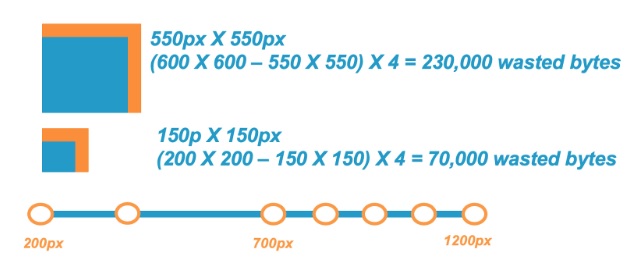

As you can see, delivering a 200 X 200 pixel (px) image for a 150 X 150 px use case (50 extra pixels in width and height) results in 70,000 wasted bytes required in memory for the browser to display the image than if the image were delivered at 150 X 150 px.

When looking at the larger image example, delivering a 600 X 600 px image instead of a 550 X 550 px use case (still 50 extra pixels in height and width) resulted in 230,000 wasted bytes, or 3.3-times more wasted bytes. This illustrates why it's recommended to have more breakpoints at larger image sizes (in this case, images larger than 700 px in width).

Another example to consider involves displaying images on a typical smartphone, in this case, the Samsung Galaxy S5. This model has a screen resolution of 1080 X 1920 px. Take, for example, a server sending an image of 1200 X 2000 px dimensions that must be resized to 1080 X 1920 px. This would result in more than 1,305,600 bytes — that's 1.3 MB — waste, not to mention a significant degradation in user experience.

Read Image Optimization Best Practices for Device Breakpoints - Part 2, covering 4 tips for getting image breakpoints right.

Hot Topics

The Latest

I've spent a lot of time in the channel, and one thing I keep coming back to is this: a partner program is only as good as what it looks like in the field. Many programs look great on paper, but when a partner is in front of a customer navigating a complex hybrid environment or trying to make the case for AI-powered observability, the gap between what a vendor promises and what it actually delivers becomes very clear, very fast ...

Enterprises today operate in a real-time environment where uninterrupted access to trusted data has become a baseline expectation for users, applications and automated systems. Traditional DataOps models, built on manual effort and human triage, cannot keep pace with this always active demand. AI agents are emerging as the operational backbone, ensuring consistent data availability, reinforcing trustworthiness and enabling a level of scale that manual processes cannot achieve ...

For decades, trust in the digital workplace rested on familiar signals. We trusted faces on video calls, voices on the phone, and emails that appeared to come from people we knew. These cues felt human and intuitive. They anchored how decisions were made, approvals were granted, and access was authorized. AI-powered deepfakes have quietly broken that model ...

Cloud migration was supposed to be a one-way door. For most enterprises, it turns out it isn't. Cloud data repatriation is a real and growing trend. A new survey ... finds that 89% of organizations plan to expand their on-premises infrastructure footprint over the next two years — and 75% have already moved at least some workloads back from public cloud in the past 24 months. The findings point to a broad rethinking of where data belongs ...

Over the past few years, large language models (LLMs) have revolutionized the software industry. Given their ability to excel at multi-step reasoning, LLMs have helped enterprises streamline workflows and adapt to the unknown. However, employing such models comes with sky-high costs, latency issues, and limited flexibility. In the realm of IT operations, it is generally wiser to employ smaller, domain-specific models instead ...

For years, DevOps teams operated under a simple assumption: collect enough telemetry, and you can find and fix any problem. That assumption is breaking down. Modern enterprises now operate across microservices, hybrid cloud environments, APIs, Kubernetes, and highly automated delivery pipelines. Releases happen continuously, dependencies shift constantly, and failures spread faster than teams can diagnose them ...

New Relic surveyed IT and engineering leaders from the media and entertainment (M&E) sector to understand what's working — and where challenges persist with their observability practices. The findings reveal how M&E organizations are navigating rising platform complexity, audience expectations, and AI-driven change. Below are five takeaways that stand out ...

Let me start with something I've seen play out more times than I can count. A team hits a wall with the cloud. Costs creep up, then spike. Performance starts to feel inconsistent. Someone in finance asks a simple question like "why did this double?" and nobody has a clean answer ... Maybe this isn't the right place for everything. That realization feels like a breakthrough, like you've identified the problem. In reality, you've just identified the starting line ...

In MEAN TIME TO INSIGHT Episode 24, Shamus McGillicuddy, VP of Research, Network Infrastructure and Operations, at EMA discusses network observability tool sprawl ... 

In cloud-native systems, scaling is often as simple as moving a slider. For on-premise databases, the stakes are different. Over-provisioning hardware is expensive. Under-provisioning leads to performance bottlenecks that are difficult to fix once the equipment is in the rack ...

Image Optimization Best Practices for Device Breakpoints - Part 1

Ari Weil

An effective breakpoint strategy helps deliver sharp, properly sized images, which are some of the most compelling pieces of content on a web page. Lack of such a strategy can lead to jagged images or ones that take too long to render due to excessive size, potentially reducing the overall effectiveness of web pages — and driving down the quality of the user experience.

Creation of derivative images at properly determined breakpoints is critical but often challenging for web developers and designers to achieve. Generating the right number of variants — and at the correct widths and spacings — for their users' critical devices can provide a great balance between byte savings and cache dilution.

While it's true that having too few breakpoints can improve offload, it can also deliver many unused bytes and place an unnecessarily high rendering burden on the device and browser. At the same time, when there are too many breakpoints, it may result in the opposite effect. Finding the right balance mandates some time and resource commitment, but the benefits are truly worth the exercise.

In this 2-part blog, we will explore just how significant image breakpoints are to businesses, and some important device-related factors to consider in image breakpoint decisions — from screen resolution market share and user base, to device characteristics to pixel density — to deliver the optimally-sized web image every time.

The Byte Loss Breakdown

Getting image breakpoints right is especially important at larger image widths. To illustrate, let's look at this example in which a web page is displaying two images that need to be resized by the browser 50 pixels in both height and width:


As you can see, delivering a 200 X 200 pixel (px) image for a 150 X 150 px use case (50 extra pixels in width and height) results in 70,000 wasted bytes required in memory for the browser to display the image than if the image were delivered at 150 X 150 px.

When looking at the larger image example, delivering a 600 X 600 px image instead of a 550 X 550 px use case (still 50 extra pixels in height and width) resulted in 230,000 wasted bytes, or 3.3-times more wasted bytes. This illustrates why it's recommended to have more breakpoints at larger image sizes (in this case, images larger than 700 px in width).

Another example to consider involves displaying images on a typical smartphone, in this case, the Samsung Galaxy S5. This model has a screen resolution of 1080 X 1920 px. Take, for example, a server sending an image of 1200 X 2000 px dimensions that must be resized to 1080 X 1920 px. This would result in more than 1,305,600 bytes — that's 1.3 MB — waste, not to mention a significant degradation in user experience.

Read Image Optimization Best Practices for Device Breakpoints - Part 2, covering 4 tips for getting image breakpoints right.

Hot Topics

The Latest

I've spent a lot of time in the channel, and one thing I keep coming back to is this: a partner program is only as good as what it looks like in the field. Many programs look great on paper, but when a partner is in front of a customer navigating a complex hybrid environment or trying to make the case for AI-powered observability, the gap between what a vendor promises and what it actually delivers becomes very clear, very fast ...

Enterprises today operate in a real-time environment where uninterrupted access to trusted data has become a baseline expectation for users, applications and automated systems. Traditional DataOps models, built on manual effort and human triage, cannot keep pace with this always active demand. AI agents are emerging as the operational backbone, ensuring consistent data availability, reinforcing trustworthiness and enabling a level of scale that manual processes cannot achieve ...

For decades, trust in the digital workplace rested on familiar signals. We trusted faces on video calls, voices on the phone, and emails that appeared to come from people we knew. These cues felt human and intuitive. They anchored how decisions were made, approvals were granted, and access was authorized. AI-powered deepfakes have quietly broken that model ...

Cloud migration was supposed to be a one-way door. For most enterprises, it turns out it isn't. Cloud data repatriation is a real and growing trend. A new survey ... finds that 89% of organizations plan to expand their on-premises infrastructure footprint over the next two years — and 75% have already moved at least some workloads back from public cloud in the past 24 months. The findings point to a broad rethinking of where data belongs ...

Over the past few years, large language models (LLMs) have revolutionized the software industry. Given their ability to excel at multi-step reasoning, LLMs have helped enterprises streamline workflows and adapt to the unknown. However, employing such models comes with sky-high costs, latency issues, and limited flexibility. In the realm of IT operations, it is generally wiser to employ smaller, domain-specific models instead ...

For years, DevOps teams operated under a simple assumption: collect enough telemetry, and you can find and fix any problem. That assumption is breaking down. Modern enterprises now operate across microservices, hybrid cloud environments, APIs, Kubernetes, and highly automated delivery pipelines. Releases happen continuously, dependencies shift constantly, and failures spread faster than teams can diagnose them ...

New Relic surveyed IT and engineering leaders from the media and entertainment (M&E) sector to understand what's working — and where challenges persist with their observability practices. The findings reveal how M&E organizations are navigating rising platform complexity, audience expectations, and AI-driven change. Below are five takeaways that stand out ...

Let me start with something I've seen play out more times than I can count. A team hits a wall with the cloud. Costs creep up, then spike. Performance starts to feel inconsistent. Someone in finance asks a simple question like "why did this double?" and nobody has a clean answer ... Maybe this isn't the right place for everything. That realization feels like a breakthrough, like you've identified the problem. In reality, you've just identified the starting line ...

In MEAN TIME TO INSIGHT Episode 24, Shamus McGillicuddy, VP of Research, Network Infrastructure and Operations, at EMA discusses network observability tool sprawl ... 

In cloud-native systems, scaling is often as simple as moving a slider. For on-premise databases, the stakes are different. Over-provisioning hardware is expensive. Under-provisioning leads to performance bottlenecks that are difficult to fix once the equipment is in the rack ...